Model creator: Unknown
Rendered: Maya/Arnold
Last Updated: 4.30.2026
Work Status: Available for work
Desired work: Illustration or Animation
Emp type: Freelance / Contract / Hire
Env type: Remote or Onsite (locally)
Hourly Rate: Negotiable
To open an additional page of personal information
and work history about John A Burnham.
*Details for all skillsets coming soon.
*Details for all software coming soon.

To view this and many other animations I've made, please click this link to my YouTube Support Channel.
Camshafts, pistons, rods, valves, lifters, combustion and pretty much anything else can be animated off just two rotational keyframes that drive the crankshaft. Those two crankshaft key frames make up the 360° cycle and act as a driver to animate everything else associated with it.
Because of this configuration, by moving the second keyframe forward or backward in the timeline, you increase or decrease the speed of the crankshaft's playback, which in turn affects everything directly proportional to the crankshaft. This allows precise control over the engine's speed making animations, such a fast quick revving, down to a slow idle conveniently easy.
I accomplished this animation using Autodesk Maya with the help of:
Since 1993, I have been creating illustration images in one form or another for the automotive industry, the US military or for other business areas. Although most of my experience has been while using Adobe Illustrator, I also have a fair amount of time with CorelDraw.
Illustrations can be created for a project from a simple verbal explanation, overlay drawings from supplied goby's (hand sketched or photo) or directly exported from a positioned camera model via CAD software.
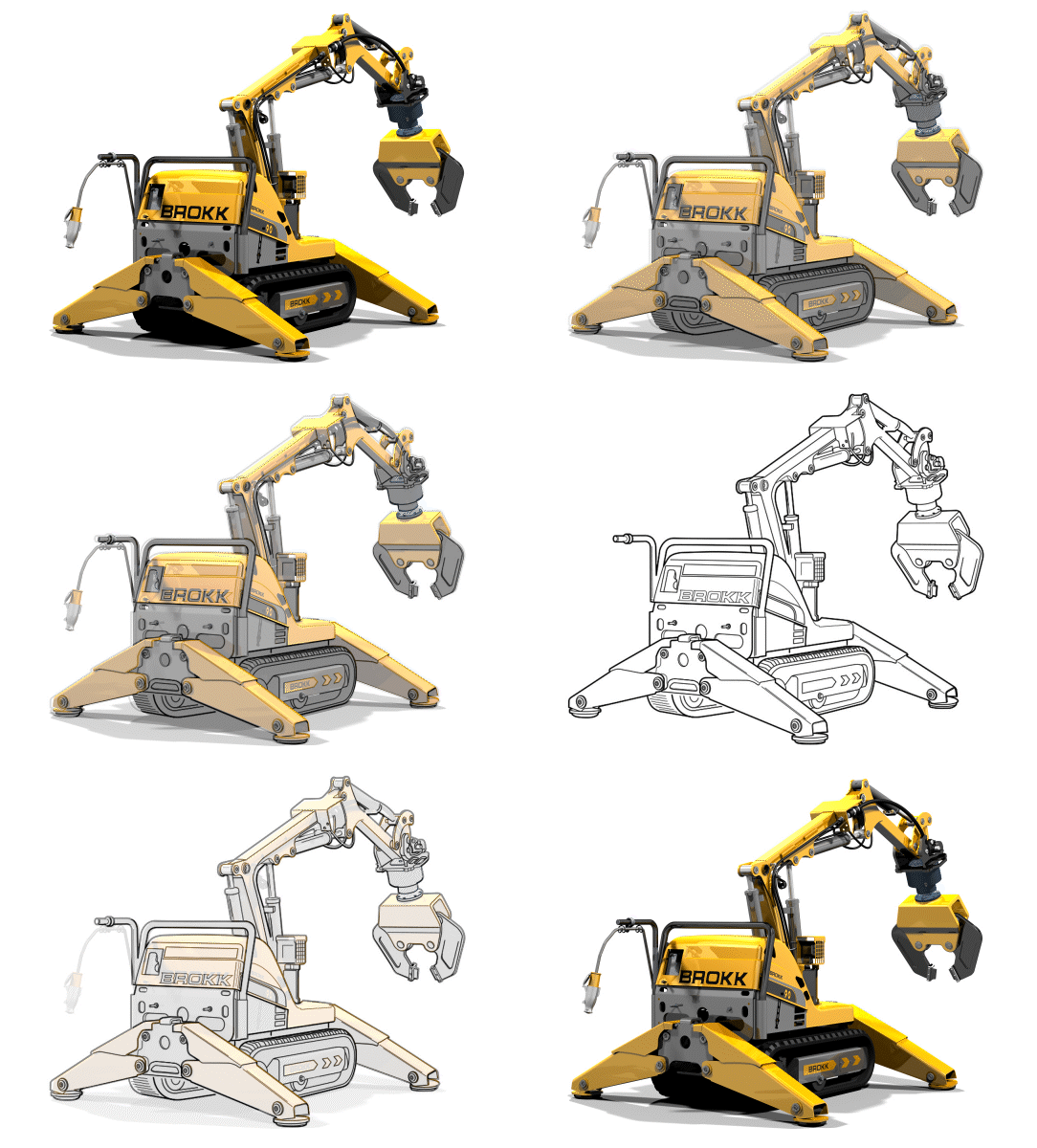
The following three examples are vector-based illustrations I created in Adobe Illustrator. By importing the reference art, drawing the edges, contours (even gradients) over the top of it will result in a final light weight line-art version of the photo or sketch that, once exported (without the reference art) the final piece can easily be imported for display on a website, printed manual or color brochure.
Illustration parameters include line weight and cap type, color style, dotted line separation distance, (LOD) level of detail and other parameters. All of which can vary per employer, but is typically stated in a supplied production style guide.
Example References: These three examples have been created by me from random images that I personally selected off the web to be my reference art (I am not aware of their original creators). Through a series of visual dissolves, these embedded gif files reveal the stages of overlay creation;
A - the refence art, B - drawing overlayed, and then C - the final black and version for export.
Although not required to be an illustrator, electrical knowledge is always helpful when working on any project that entails schematic drawings or circuits for continuity. I've had electrical knowledge since I was young, so I am very comfortable creating and animating electrical circuits.

To achieve a 12VDC (direct current) output from a 120VAC (alternating current) source, a diode configuration circuit called a "bridge rectifier" is incorporated to pass only the upper portion of the reduced 12VAC sign wave thus forcing the AC signal to flow as DC. A step-down transformer reduces the voltage from 120VAC to 12VAC while a ceramic capacitor (C2) is added to smooth out the rectified current.
A pending animated version of this circuit is still to come. The example will be a demonstration of my existing "Flash" style skillset usage utilizing HTML5 (instead of Action Script 3) in Adobe Animate.

Electrical schematics are like building blueprints. They clearly show the path of electricity and the components it flows through along the way. The symbols shown above are only a handful of such symbols, but I thought it important to show my knowledge and awareness of them.
My Father: The neighborhood Television & Radio repair man
During World War II, my father was a Sergeant in the Army and a communication & electronics repair expert. After the war he started a television and radio repair service and did his work at both a shop and at home. Because of this, at a young age I was exposed to electronics and electrical test equipment such as voltmeters, oscilloscopes and tube testers. As I got older, I became technically interested in electronics and somewhat educated myself on the subject. Ohm's law, understanding diodes and bridge rectifiers, resister color codes, reading schematics, etc. This knowledge has been continuously helpful to me in many aspects of my career while creating multimedia assets.
Color illustrations can also be created from supplied sketch art. For the Clown example below, I unfortunately do not have the original sketched art, but all colors and shadings were matched to meet the original artist's rendition. I then supplied the final Adobe Illustrator file to the client, as well as an editable EPS file and a printable color PDF file for any promotional use.

Final art: The Fun House Band Clown

Real world use: The "Fun House Band" clown logo utilized on the bass drum head and a larger printed banner style display.
Illustration art can also be created quickly from CAD 3D files (of programs such as NX, IDEAS, CATIA, Creo Parametric, etc.) by essentially exporting a camera positioned CAD models wire (lines) and spline information as "vector" information to an .eps or native .ai Illustrator format. This exported file can then be opened in a vector art manipulation program such as Adobe Illustrator or CorelDraw for further editing.

Creo Parametric Program

Creo Parametric Display
Illustration job posts mention Creo Parametric quite a bit, but much like IDEA's, NX and many other CAD software I've interfaced with, the export process to a vector file format with Creo is not much different.
My knowledge of Creo Parametric is minimal, although I did experience the demo years ago. As I understood it, Creo Parametric is a powerful engineering software that is much more than a CAD editor as it includes a high-end rendering engine (such as KeyShot) which I am familiar with.
I am not a CAD designer, but given the need and the opportunity to embrace the software's interface for productivity, I am more than confident I can get up to speed with the Creo Parametric process and become efficient at vector exporting quite quickly.
Computer Graphics
Technical Training Needs Graphic Support!
Contact: John Albert Burnham
If you are in need of graphical / animation support for any of your projects, don't hesitate to contact me. I am setup and ready to work. I'm located in Plymouth Michigan and have a strong internet connection to b remote.